Ne perdez plus jamais
un mot de vos cours
.
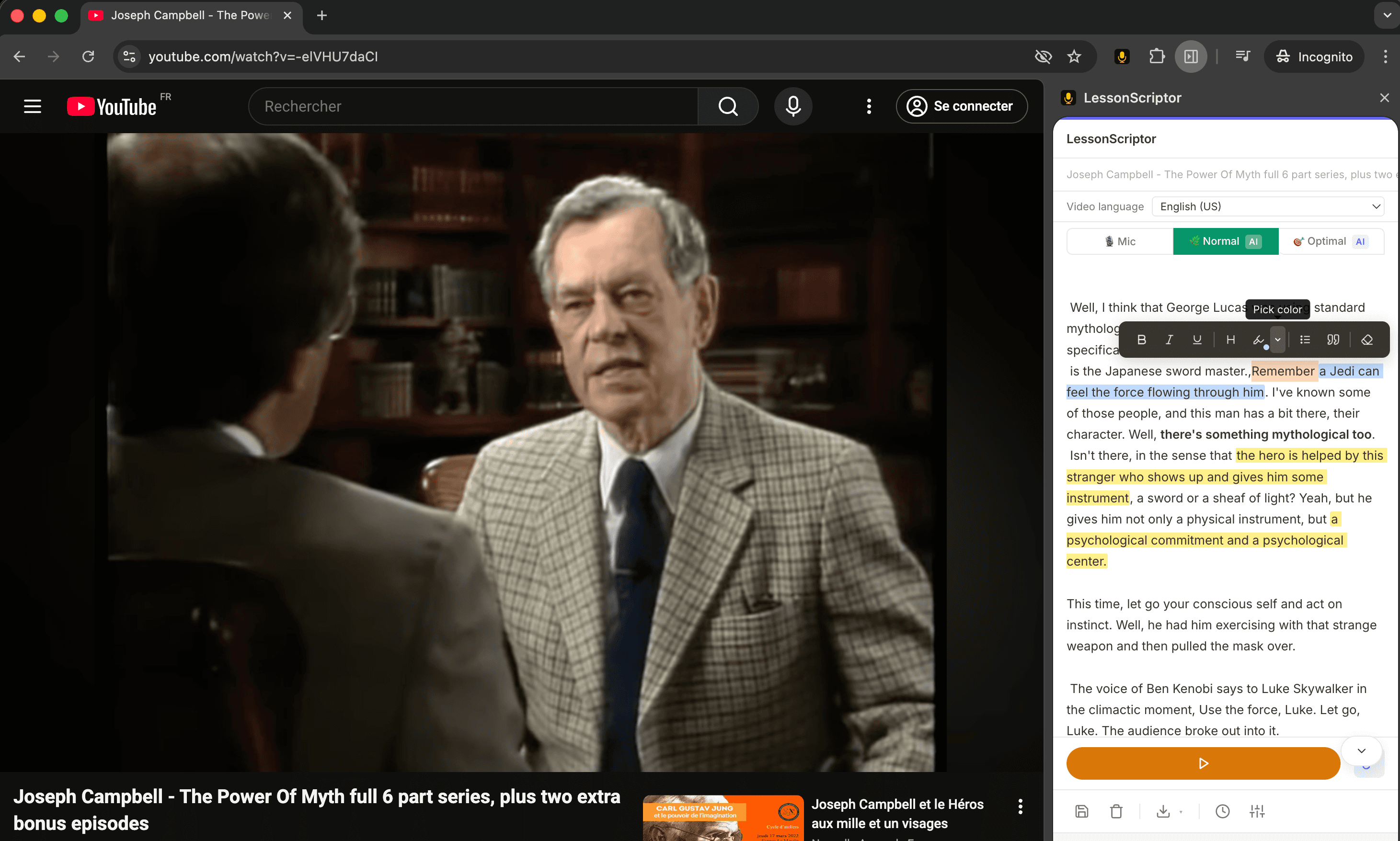
LessonScriptor transcrit vos CM et cours en ligne automatiquement — pour que vous puissiez vous concentrer sur la compréhension, pas sur la prise de notes. Que ce soit sur l'ENT de votre fac ou sur FUN-MOOC, conçu pour les étudiants, les personnes TDAH et tous ceux qui apprennent mieux en lisant en même temps.
Installer gratuitement — Extension ChromeGratuit · Pas de spam · Alerte de lancement uniquement
Le problème
Votre cerveau peine à écrire et
écouter en même temps.
Les cours avancent vite. Les notes prennent du retard. Vous finissez par choisir entre comprendre et noter — et dans les deux cas, quelque chose vous échappe.
Le CM va trop vite
En amphi, le prof déroule sans attendre. Vos notes sont incomplètes — ou illisibles — et le TD de demain arrive vite.
Le TDAH complique tout
Partager son attention entre écouter et écrire est épuisant. Quelque chose finit toujours par échapper.
Langue non maternelle
Suivre un cours rapide dans une langue étrangère double la charge cognitive.
Pas de notes = partiel dans le flou
Sans notes écrites, réviser pour le partiel signifie se retaper l'intégralité du cours en vidéo. Bon courage pour le rattrapage.
Notre histoire
Né sur la
table de la cuisine.
Nous sommes Victoria et Pierre — un couple du sud de la France. Victoria étudie l'anthropologie en ligne — chaque cours, chaque séminaire, chaque atelier diffusé depuis la maison. Pierre adore créer des choses avec du code. Tout a commencé comme un projet annexe pour voir si une petite extension Chrome pouvait aider — et c'est devenu quelque chose que tout le monde mérite, selon nous.
Les journées de Victoria, ce sont des heures de cours vidéo à la suite. Prendre des notes en regardant, c'était perdre le fil. Rembobiner, réécrire, re-regarder. Des notes trop maigres pour réviser, ou trop brouillonnes pour être relues. En plus, elle a un TDAH — ce qui rend le partage de l'attention entre écouter et écrire non seulement difficile, mais épuisant.
Alors Pierre s'est mis à coder, et Victoria a testé chaque version — cassé des trucs, donné son avis, expliqué ce qui manquait vraiment. Soir après soir, portable contre portable.
Voici le résultat. Nous le rendons accessible à tous parce qu'aucun étudiant ne devrait avoir à choisir entre écouter et écrire. Si cela vous aide ne serait-ce qu'une fois, ça en valait la peine.
Pour qui
Conçu pour ceux qui apprennent en lisant en même temps
Étudiants de L1 à M2
CM en amphi, cours sur Moodle, replays Panopto, FUN-MOOC — capturez tout sans perdre le fil de ce qui est dit.
Le mode gratuit suffitApprenants TDAH
Lire en même temps qu'on écoute réduit considérablement la charge cognitive. Fini les décrochages en plein cours.
Accessibilité avant toutNon-francophones
Vous suivez des cours dans une autre langue ? La transcription en temps réel vous permet de suivre sans perdre un mot.
Toutes les languesApprenants en ligne & SED
Udemy, Coursera, YouTube, cours du SED de votre fac — transformez n'importe quelle vidéo en notes consultables et modifiables automatiquement.
Tout site vidéoÉdition en direct
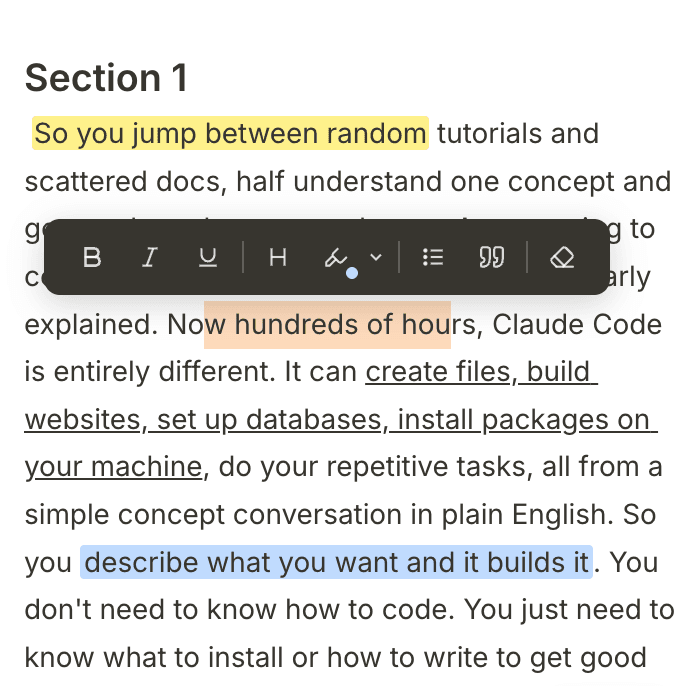
Éditez en regardant.
Surlignez en 5 couleurs, mettez en gras les termes clés, ajoutez des titres et des puces — transformez une transcription brute en notes prêtes à réviser sans quitter la vidéo.
Ce que ça fait
Tout ce qu'il vous faut.
Rien de superflu.
Une précision fiable
L'audio est envoyé par segments — 10 secondes en mode Normal, 30 secondes en mode Optimal pour une précision encore meilleure. Un léger délai, mais un texte bien plus précis que toute alternative en temps réel.
Un vrai éditeur de notes
Ne vous contentez pas de lire — travaillez directement dans la transcription. Surlignez les passages clés, mettez en gras les termes importants, ajoutez des titres et des puces, supprimez ce qui ne sert pas. La plupart des étudiants finissent leurs notes avant la fin du cours.
Exportez partout
Téléchargez en .txt ou .md, ou copiez dans le presse-papiers. Vos notes, votre format.
14 langues
Anglais, français, espagnol, arabe, hindi et plus encore. Transcrivez dans la langue de votre cours — idéal pour les non-francophones qui suivent en lisant.
Confidentialité d'abord
Tout reste en local par défaut — pas de compte, pas de traitement cloud en mode gratuit. Votre audio, vos données.
Historique des sessions
Toutes vos transcriptions passées sont sauvegardées automatiquement. Reprenez là où vous vous étiez arrêté — rien n'est jamais perdu.
Compatibilité
Fonctionne partout où
l'audio est diffusé.
ENT de votre fac, Moodle, Panopto, vidéos protégées, sites publics — si le son sort de votre ordinateur, on peut le transcrire.
Plateformes universitaires
Moodle, Canvas, Blackboard, Panopto — celles sans téléchargement, sans sous-titres et sans aide. Si la vidéo se lit dans votre navigateur, nous la transcrivons.
Sites vidéo publics
YouTube, Coursera, Udemy — tous les classiques. Mais aussi n'importe quel lecteur intégré sur n'importe quel site, aussi obscur ou atypique soit-il.
Fonctionne avec un casque
Le mode IA capture l'audio de l'onglet directement depuis le navigateur — pas besoin de micro ni de haut-parleurs. Étudiez à 2h du matin sans déranger personne.
Comment les deux modes capturent l'audio
Free mode Le mode gratuit utilise votre microphone pour capter l'audio par vos haut-parleurs. Fonctionne sur toutes les plateformes — mais le volume compte. Montez le volume système pour une meilleure précision.
AI mode Le mode IA capture l'audio de l'onglet directement, sans passer par votre micro. Capture nette avec un casque, à n'importe quel volume, sur toute plateforme protégée.
Tarifs
Gratuit pour toujours. Payez uniquement
ce que vous transcrivez.
Commencez gratuitement avec votre microphone. Rechargez quand vous avez besoin de la transcription IA — sans abonnement, sans expiration.
Pourquoi le mode IA est-il payant ? Le mode gratuit utilise la reconnaissance vocale intégrée à votre navigateur — locale, instantanée, gratuite. Le mode IA envoie votre audio à un modèle d'IA cloud de pointe. Ce traitement a un coût réel. Nous le répercutons en toute transparence : les crédits sont consommés seconde par seconde depuis votre pack, ils n'expirent jamais, et vous choisissez la vitesse de consommation selon le mode de transcription utilisé.
Gratuit
Utilise le moteur vocal intégré à votre navigateur et votre microphone. Entièrement local — aucun audio envoyé nulle part.
- ✓ Transcription via microphone
- ✓ Édition complète — surlignage, gras, titres, puces
- ✓ Export .txt, .md, presse-papiers
- ✓ 14 langues
- ✓ Historique des sessions et sauvegarde auto
- – Fonctionne avec un casque
- – Précision IA cloud
Mode IA — Paiement à l'usage
Achetez un pack une fois. Vos heures sont consommées seconde par seconde pendant la transcription, rien n'est gaspillé quand vous arrêtez. Plus le pack est gros, plus le prix à l'heure est bas.
Fonctionne avec un casque. L'audio de l'onglet est capturé directement — pas besoin de micro ni de haut-parleurs.
Paiements traités de manière sécurisée par Stripe.
- ✓ Tout le mode Gratuit, y compris l'édition complète
- ✓ Moteur IA cloud — bien plus précis que la reconnaissance vocale du navigateur
- ✓ Audio direct de l'onglet — fonctionne avec n'importe quel casque
- ✓ Meilleure précision sur les accents et le bruit de fond
- ✓ Heures consommées seconde par seconde — rien de gaspillé quand vous arrêtez
- ✓ Les crédits n'expirent jamais — rechargez quand vous voulez
- ✓ 10 min de grâce si vos crédits s'épuisent en plein cours
Achetez une fois, utilisez quand vous voulez. Un semestre complet à 3h/semaine coûte environ 21 $ — moins cher qu'un repas au CROUS par semaine.
Démarrage rapide
Opérationnel
en 60 secondes
Pas de compte. Pas de configuration. Installez et c'est parti.
Installez l'extension
Ajoutez-la à Chrome depuis le Web Store. Aucune inscription requise.
Chrome Web StoreOuvrez n'importe quelle vidéo
Allez sur YouTube, Coursera, Udemy — n'importe quel site avec un cours en vidéo.
Tout site vidéoAppuyez sur Enregistrer
Cliquez sur l'icône de l'extension, ouvrez le panneau latéral, appuyez sur Enregistrer. C'est tout.
Le panneau latéral s'ouvreRessources utiles
Allez plus loin.
Apprenez mieux.
Des guides pratiques sur la prise de notes, la concentration et les outils d'étude — écrits pour les étudiants qui apprennent autrement.
Les 12 meilleures applis pour étudiants TDAH en 2026
Un kit complet : prise de notes, concentration, gestion des tâches et mémoire.
Comment prendre des notes avec un TDAH
Pourquoi votre cerveau ne peut pas écouter et écrire en même temps — et quoi faire à la place.
Comment se concentrer en cours en ligne avec un TDAH
6 stratégies validées par la science et les meilleurs outils pour rester attentif.
Le modèle de prise de notes TDAH
Un modèle gratuit et adapté au TDAH, inspiré de la méthode Cornell.
Assistance
Questions fréquentes
Comment fonctionnent les crédits ?
Achetez un pack de crédits et vous recevrez une clé de licence par e-mail. Ouvrez les paramètres de l'extension, entrez la clé, et vos crédits s'activent immédiatement. Ils sont consommés seconde par seconde pendant la transcription — rien n'est gaspillé quand vous arrêtez.
J'ai perdu mon code d'activation. Que faire ?
Vérifiez votre boîte de réception — la clé vous a été envoyée lors de l'achat. Votre clé est portable : elle fonctionne sur n'importe quel ordinateur, survit aux réinstallations, et vos crédits restants sont toujours préservés. Considérez-la comme un solde prépayé, pas une licence liée à un appareil.
La transcription est dans la mauvaise langue.
Assurez-vous d'avoir sélectionné la bonne langue dans les paramètres de l'extension avant de commencer. Si vous avez changé de langue en cours de session, arrêtez la transcription, sélectionnez la bonne langue, puis relancez. Le moteur vocal a besoin d'un redémarrage propre pour changer de langue.
La transcription ne fonctionne pas du tout.
Essayez ces étapes dans l'ordre : (1) Vérifiez que l'extension est à jour — cherchez les mises à jour dans chrome://extensions. (2) Rechargez l'extension en la désactivant puis en la réactivant. (3) Rechargez la page contenant la vidéo. (4) Vérifiez votre connexion internet — le mode IA en a besoin. (5) Si vous utilisez le mode micro, assurez-vous que le volume système est suffisamment élevé (80 %+) et que vous avez accordé à l'extension l'accès au microphone.
Le mode microphone ne capte pas l'audio.
C'est presque toujours un problème de volume. Le mode gratuit repose sur la captation de vos haut-parleurs par le micro — plus le volume système est élevé, meilleure est la captation. Les utilisateurs de MacBook Air ont généralement besoin d'un volume plus élevé que ceux de MacBook Pro. Vérifiez aussi que vous avez autorisé l'accès au microphone pour l'extension.
Puis-je transcrire plusieurs vidéos en même temps ?
Oui — mais uniquement avec le mode IA. Le mode IA capture l'audio onglet par onglet, chaque vidéo fonctionne donc indépendamment. Le mode gratuit (micro) capte tout ce que jouent vos haut-parleurs, donc mélanger les sources audio perturbera la transcription.
Nous contacter
Aidez-nous à construire quelque chose
que vous allez vraiment adorer.
Cette extension est née d'un vrai besoin. Si vous avez des idées, rencontrez un bug ou voulez simplement dire bonjour — nous lisons tout.
Suggestions de fonctionnalités
Il manque quelque chose ? Dites-nous ce qui rendrait l'outil meilleur pour vous.
Signalements de bugs
Quelque chose ne fonctionne pas ? Nous voulons le savoir — plus il y a de détails, mieux c'est.
Juste un bonjour
Nous adorons sincèrement savoir comment les gens utilisent l'extension. Laissez-nous un petit mot.
Cette extension est née d'un vrai besoin. Si vous avez des idées, rencontrez un bug ou voulez simplement dire bonjour — nous lisons tout.
Envoyer →Parce qu'apprendre, ça ne devrait pas vouloir dire tout écrire à la main.
Gratuit à installer. Gratuit à utiliser. Conçu pour les apprenants qui méritent de meilleurs outils.
Installer gratuitement — Extension Chrome